Why and How? – S4DS
Customer Service Workflows are structured roadmaps that guide customer interactions from the initial point of contact through to the resolution. In the complex landscapes of Direct Selling and Omnichannel retail businesses, these workflows are essential for advanced commerce businesses.
By implementing customer service workflows correctly, companies can achieve streamlined operations, enhanced customer experiences, and scalable growth.
But when tickets or incidents aren’t assigned to the appropriate teams or solved through structured practices and workflows, the result is often operational inefficiencies, poor customer service, and even compliance risks.
In this blog, based on S4DS’s over 30 years of experience, we will offer creative solutions on how to effectively apply customer service workflows to overcome these hurdles and unlock new business success.
How to Implement Customer Service Workflows Effectively?

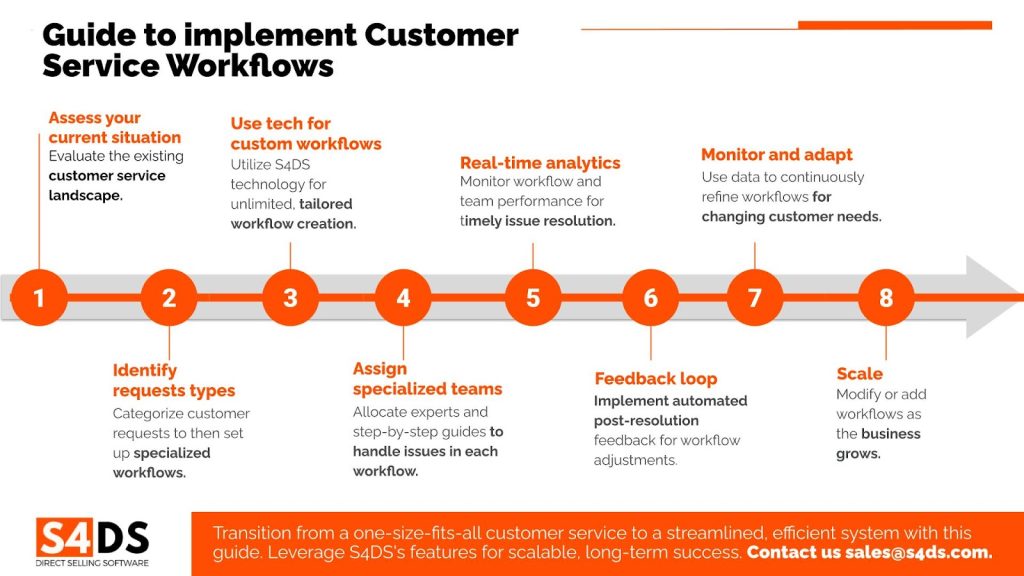
Step 1: Assess Your Current Situation
Before diving into workflow implementation, evaluate your current customer service landscape. Are all customer service requests coming in as a single stream, without categorization? If so, this is your starting point.
Step 2: Identify Different Types of Customer Requests
Categorize the types of customer requests you commonly receive. These could range from return requests and credit inquiries to general questions and complaints. This step is crucial for setting up specialized workflows later.
Step 3: Leverage technology to Create Custom Workflows
You can create workflows tailored to each type of customer request. With S4DS’s technology, you will have unlimited workflow creation, so you can be as specific and strategic as needed.
Step 4: Assign Specialized Teams
For each workflow, assign a specialized team or person or at least detailed processes with expertise to handle those issues. This ensures that tickets are not just resolved quickly but also effectively.
Step 5: Implement Real-Time Tracking and Analytics
Use as much as possible real-time analytics to monitor the performance of each workflow and team. This data will be invaluable for making improvements and ensuring issues are resolved in a timely manner.
Step 6: Establish a Feedback Loop
Automated post-resolution feedback loop. Use this to gauge customer satisfaction and make necessary adjustments to your workflows.
Step 7: Monitor and Adapt
The customer service landscape is ever-changing. Use the analytics and feedback data to continuously adapt and improve your workflows according to new customer requests, or new segments of consumers.
Step 8: Scale as You Grow
As your business grows, you can easily add new workflows or modify existing ones to meet evolving needs.
With this step-by-step guide, Direct Selling and Omnichannel retail businesses can transition from a chaotic, one-size-fits-all customer service approach to a highly organized, efficient, and effective system. And with S4DS’s robust features, you’re not just implementing workflows; you’re setting your business up for scalable, long-term success. Here are some more details about S4DS customer service workflows:
S4DS’s Solution: Improve Customer Service with Workflow Automation and Analytics
Here’s where S4DS software comes into play. Our platform offers a creative solution to this challenge through workflow automation and real-time analytics.
- Automated Ticket Assignment: With S4DS, you can set up rules that automatically assign tickets to the appropriate teams based on the issue type, customer profile, or other criteria. This eliminates manual sorting and ensures that each ticket is handled by a specialist.
- Real-Time Tracking and Analytics: Our platform provides real-time insights into the status of each ticket and the performance of each team. This enables executives to make data-driven decisions and ensures that issues are resolved in a timely manner.
- Customer Feedback Loop: S4DS software allows for an automated feedback loop post-resolution. This not only helps in continuous improvement but also strengthens customer trust and long-term relationships.
S4DS’s Configurable Workflows for Different Ticket Types
In S4DS, workflows are not a one-size-fits-all solution. You can configure different workflows based on the type of ticket, ensuring that each issue goes through the appropriate steps for review, evaluation, and resolution.
These are some examples of workflows in S4DS that your business can take advantage of:
Return Type Tickets
For tickets related to returns, a typical workflow could include the following configurable steps:
- The user requests a refund through available channels.
- A return-type ticket is created.
- Information is reviewed, or additional details are requested.
- The return is either accepted or rejected, concluding with issuing a credit note or a refund.
Credit Type Tickets
For credit-related issues, the workflow might look like this:
- The user creates a ticket through the available channels.
- Data review by the company’s credit team.
- “Missing data” status, if required information is not complete.
- Credit balance assignment based on risk assessment.
- Approval or denial of the given credit, closing the ticket.
General Tickets
For general inquiries, these steps are configurable, but the workflow could be as simple as:
- Ticket creation through enabled channels.
- In-progress status for message review and response.
- Closing the ticket after providing the requested information.
Complaints and Claims Tickets
For more sensitive issues like complaints and claims, the workflow could involve:
- Ticket creation through enabled channels.
- “In progress”: Initial response to the user.
- Escalation to the customer success team for review and resolution.
- Closing the ticket, either satisfactorily or unsatisfactorily, based on the outcome.
Unlimited Workflow Creation
One of the standout features of S4DS is its scalability. There are no limits to the number of workflows you can create, allowing you to adapt as your business grows and as new types of customer issues emerge.
The Impact: A Win-Win for Everyone
When you implement these customer service workflows effectively, you’re setting your business up for success. You improve customer satisfaction, optimize team productivity, and build a reputation for efficiency and reliability in the market.
Interested in maximizing the efficiency of your customer service workflows? Discover the full range of features that S4DS offers in a free guided demo. Contact us today to schedule your personalized demo.

